# Copyright 2024 Google LLC
#
# Licensed under the Apache License, Version 2.0 (the "License");
# you may not use this file except in compliance with the License.
# You may obtain a copy of the License at
#
#     https://www.apache.org/licenses/LICENSE-2.0
#
# Unless required by applicable law or agreed to in writing, software
# distributed under the License is distributed on an "AS IS" BASIS,
# WITHOUT WARRANTIES OR CONDITIONS OF ANY KIND, either express or implied.
# See the License for the specific language governing permissions and
# limitations under the License.
Analyzing package downloads from PyPI with BigQuery DataFrames#
In this notebook, you’ll use the PyPI public dataset and the deps.dev public dataset to visualize Python package downloads for a package and its dependencies.
# Choose a package which you want to visualize.
package_name = "pandas"
import bigframes.pandas as bpd

# Use `ordering_mode="partial"` for more efficient query generation, but
# some pandas-compatible methods may not be possible without a total ordering.
bpd.options.bigquery.ordering_mode = "partial"
Counting downloads and tracking dependencies#
The PyPI file_downloads table contains a row for each time there is a download request for a package. The deps.dev Dependencies table contains a row for each dependency of each package.
When ordering_mode = "partial", read_gbq_table creates a DataFrame representing the table, but the DataFrame has no native ordering or index.
import bigframes.enums

# Without ordering_mode = "partial" it is recommended that you set
# the "filters" parameter to limit the number of rows subsequent queries
# have to read.
pypi = bpd.read_gbq_table(
    "bigquery-public-data.pypi.file_downloads",

    # Using ordering_mode = "partial" changes the default index to a "NULL"
    # index, meaning no index is available for implicit joins.
    #
    # Setting this explicitly avoids a DefaultIndexWarning.
    index_col=bigframes.enums.DefaultIndexKind.NULL,
)
deps = bpd.read_gbq_table(
    "bigquery-public-data.deps_dev_v1.Dependencies",
    index_col=bigframes.enums.DefaultIndexKind.NULL,
)
Limit to the most recent 7 days of data#
The PyPI and deps.dev tables are partitioned by date. Query only the most recent 7 days of data to reduce the number of bytes scanned.
Just as with the default ordering mode, filters can be describe in a pandas-compatible way by passing a Boolean Series to the DataFrame’s __getitem__ accessor.
import datetime

now = datetime.datetime.now(datetime.timezone.utc)
last_7_days = now - datetime.timedelta(days=7)
last_30_days = now - datetime.timedelta(days=30)
pypi = pypi[pypi["timestamp"] > last_7_days]
deps = deps[deps["SnapshotAt"] > last_30_days]  # deps are refreshed less frequently
deps = deps[deps["System"] == "PYPI"]
⚠ Warning
Without ordering_mode = "partial", these filters do not change the number of bytes scanned. Instead, add column and row filters at “read” time. For example,
import datetime

last_7_days = datetime.datetime.now(datetime.timezone.utc) - datetime.timedelta(days=7)

# Without ordering_mode = "partial", one must limit the data at "read" time to reduce bytes scanned.
pypi = bpd.read_gbq_table(
    "bigquery-public-data.pypi.file_downloads",
    columns=["timestamp", "project"],
    filters=[("timestamp", ">", last_7_days)],
)
head() is not available when no ordering has been established. It fails with OrderRequiredError. Use peek() instead to download a sample of the data. This will be much more efficient, as the query doesn’t need to order all rows to determine which are first.
# Warning: Ensure bpd.options.bigquery.ordering_mode = "partial" or else
# this query() will cause a full table scan because of the sequential index.
assert bpd.options.bigquery.ordering_mode == "partial"
pypi.peek()
| timestamp | country_code | url | project | file | details | tls_protocol | tls_cipher | |
|---|---|---|---|---|---|---|---|---|
| 0 | 2024-09-18 18:15:04+00:00 | US | /packages/ff/c8/4cd4b2834012ffc71ae3fd69187f08... | aiobreaker | {'filename': 'aiobreaker-1.2.0-py3-none-any.wh... | {'installer': {'name': 'pip', 'version': '21.1... | TLSv1.3 | TLS_AES_128_GCM_SHA256 |
| 1 | 2024-09-18 18:29:50+00:00 | US | /packages/21/8e/4562029e179226051cd4aa3135444d... | aiobotocore | {'filename': 'aiobotocore-1.3.0.tar.gz', 'proj... | {'installer': {'name': 'pip', 'version': '24.1... | TLSv1.2 | ECDHE-RSA-AES128-GCM-SHA256 |
| 2 | 2024-09-18 18:22:14+00:00 | US | /packages/11/16/4226e59bb72e096d9809ccedf349a1... | aiobotocore | {'filename': 'aiobotocore-2.0.1.tar.gz', 'proj... | {'installer': {'name': 'pip', 'version': '24.2... | TLSv1.2 | ECDHE-RSA-AES128-GCM-SHA256 |
| 3 | 2024-09-18 18:22:08+00:00 | US | /packages/11/16/4226e59bb72e096d9809ccedf349a1... | aiobotocore | {'filename': 'aiobotocore-2.0.1.tar.gz', 'proj... | {'installer': {'name': 'pip', 'version': '24.2... | TLSv1.2 | ECDHE-RSA-AES128-GCM-SHA256 |
| 4 | 2024-09-18 18:29:22+00:00 | US | /packages/54/b7/453119271cc4c36b07fdeab9b0ff25... | aiobotocore | {'filename': 'aiobotocore-2.3.3.tar.gz', 'proj... | {'installer': {'name': 'pip', 'version': '24.1... | TLSv1.2 | ECDHE-RSA-AES128-GCM-SHA256 |
deps.peek()
| SnapshotAt | System | Name | Version | Dependency | MinimumDepth | |
|---|---|---|---|---|---|---|
| 0 | 2024-08-29 04:39:16.121656+00:00 | PYPI | zxkane-cdk-construct-simple-nat | 0.2.89 | {'System': 'PYPI', 'Name': 'attrs', 'Version':... | 2 |
| 1 | 2024-08-29 04:39:16.121656+00:00 | PYPI | zxkane-cdk-construct-simple-nat | 0.2.82 | {'System': 'PYPI', 'Name': 'attrs', 'Version':... | 2 |
| 2 | 2024-08-29 04:39:16.121656+00:00 | PYPI | zxkane-cdk-construct-simple-nat | 0.2.88 | {'System': 'PYPI', 'Name': 'attrs', 'Version':... | 2 |
| 3 | 2024-08-29 04:39:16.121656+00:00 | PYPI | zxkane-cdk-construct-simple-nat | 0.2.91 | {'System': 'PYPI', 'Name': 'attrs', 'Version':... | 2 |
| 4 | 2024-08-29 04:39:16.121656+00:00 | PYPI | zxkane-cdk-construct-simple-nat | 0.2.77 | {'System': 'PYPI', 'Name': 'attrs', 'Version':... | 2 |
Find dependencies for pandas#
Use assign to add columns to the DataFrame after a scalar operations, such as extracting a sub-field from a STRUCT column.
Because the DataFrame has no index, this does not work if the new column belongs to a different table expression.
deps = deps.assign(DependencyName=deps["Dependency"].struct.field("Name"))
Use an aggregation to identify the unique DependencyNames for the pandas package. Note: drop_duplicates() is not supported, as the order-based behavior such as keep="first" is not applicable when using ordering_mode = "partial".
A DataFrame with no index still supports aggregation operations. Set as_index=False to keep the GROUP BY keys as regular columns, instead of turning them into an index.
package_deps = deps[deps["Name"] == package_name].groupby(["Name", "DependencyName"], as_index=False).size()
package_deps.peek()
Count downloads for pandas and its dependencies#
The previous step created pandas_deps with all the dependencies of pandas but not pandas itself.
Combine two DataFrames with the same column names with the bigframes.pandas.concat function.
pandas_and_deps = bpd.concat(
    [
        package_deps.drop(columns=["Name", "size"]).rename(columns={"DependencyName": "Name"}),
        bpd.DataFrame({"Name": [package_name]}),
    ],

    # To join DataFrames that have a NULL index, set ignore_index = True.
    ignore_index=True,
)
Since there is no index to implicitly join on, use the merge method to join two DataFrames by column name.
pandas_pypi = pandas_and_deps.merge(pypi, how="inner", left_on="Name", right_on="project")
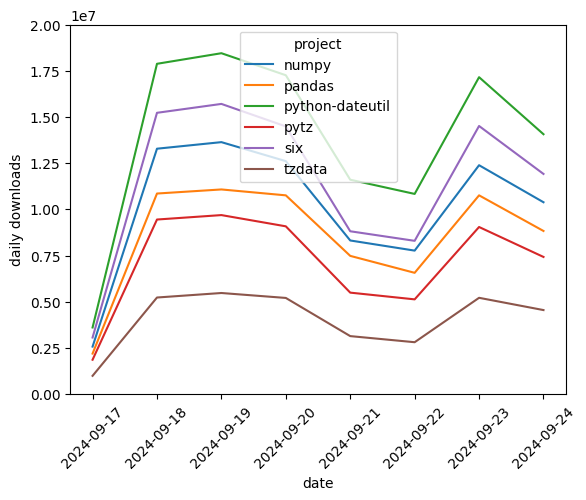
Create a time series to visualize by grouping by the date, extracted from the timestamp column.
Note: If you don’t peek() at your data and only do grouped aggregations, BigQuery DataFrames can eliminate unnecessary ordering from the compilation even without ordering_mode = "partial".
When BigQuery DataFrames aggregates over columns, those columns provide a unique key post-aggregation that is used for ordering. Any ordering applied before is overridden. By aggregating over a time series, the line plots will render in the expected order.
pandas_pypi = pandas_pypi.assign(date=pandas_pypi["timestamp"].dt.date)
downloads_per_day = pandas_pypi.groupby(["date", "project"]).size()

# Cache after the aggregation so that the aggregation only runs once.
downloads_per_day.cache()
downloads_per_day.to_pandas()
date        project
2024-09-17  numpy               2572982
            pandas              2195692
            python-dateutil     3608119
            pytz                1863133
            six                 3064640
            tzdata               991989
2024-09-18  numpy              13282573
            pandas             10856758
            python-dateutil    17877058
            pytz                9450103
            six                15225000
            tzdata              5230039
2024-09-19  numpy              13637868
            pandas             11077817
            python-dateutil    18449777
            pytz                9690329
            six                15706263
            tzdata              5473910
2024-09-20  numpy              12609524
            pandas             10758593
            python-dateutil    17257536
            pytz                9082050
            six                14489456
            tzdata              5206738
2024-09-21  numpy               8316481
            pandas              7483241
            python-dateutil    11604691
            pytz                5494178
            six                 8814983
            tzdata              3141578
2024-09-22  numpy               7768078
            pandas              6566272
            python-dateutil    10835755
            pytz                5130018
            six                 8297507
            tzdata              2811247
2024-09-23  numpy              12389164
            pandas             10758931
            python-dateutil    17153013
            pytz                9045824
            six                14512209
            tzdata              5214048
2024-09-24  numpy              10385658
            pandas              8830996
            python-dateutil    14066307
            pytz                7425446
            six                11917222
            tzdata              4550626
dtype: Int64
BigQuery DataFrames has several built-in visualization methods. Alternatively, download the time series with the to_pandas() method for further analysis and visualization.